APM - INR Peer to Peer deposits (Gateway1)#
Alternative payment methods: deposit with Peer to Peer INR transfer
Brief#
In order to create a Fixed Rate Invoice in the payment processing system, you need to make a POST request to the v2/invoices API endpoint.
https://api.xgateway.tech/api/v2/invoices INR Peer to Peer deposits
{
    "orderId": "order-test-prod",
    "customerId": "test-prod2025",
    "baseCurrency": "INR",
    "amount": 1000,
    "customerFirstName": "John",
    "customerLastName": "Doe",
    "paymentCurrency": "INR",
    "customerEmail": "[email protected]",
    "customerCountry": "AU",
    "customerPhone": "1234567890" // Must be a 10 digits number.
}
See the Alternative Payment Methods using Checkout page for the full OpenAPI specification.
The default lifetime of an invoice is 15 minutes.
Our local partners for Alternative Payment Methods may block customers using VPNs. It is generally recommended to warn customers that a payment method cannot be accessed through a VPN.
Details#
Validating limits#
The invoice creation API validates the amount value. The minimum and maximum amount values may differ based on the payment provider used for each specific invoice.
INR Peer to Peer (Gateway1) uses these:
| Currency | Min value | Max value | Increment step |
|---|---|---|---|
| INR | 300.00 (500.00 on Sandbox and for exceptional cases in production) | 100 000.00 | 0.01 |
Contact the support team if you want to confirm the limits.
Required payload#
| Parameter | Mandatory | Description |
|---|---|---|
| amount | true | Requested amount. String or Number, in d+(.d+)? format. Limits applied |
| customerId | true | Customer id in the merchant system |
| baseCurrency | true | String representation of the requested currency. INR in this case |
| orderId | false | Invoice id in the merchant system. If provided, used as an idempotency key |
| customerFirstName | false | Customer's first name |
| customerLastName | false | Customer's last name |
| customerEmail | false | Customer's email |
| customerCountry | false | Customer's country code, f.e. 'AU' |
| customerPhone | false | Customer's phone, must be a 10-digit number wrapped as string |
| paymentCurrency | false | String representation of the payment currency. INR in this case |
| paymentSystem | false | String representation of the payment system. UPI | IMPS | PhonePe at the moment. See the Conversion Improvements section down below for details |
Ensure that no additional parameters, except those specified above, are passed into the invoice creation request.
Payload examples#
The system will skip all XGateway intermediate pages and redirect the customer directly to the payment method only if all required data is provided.
INR Peer to Peer deposits
Minimal payload with orderId to create an invoice and track idempotency on the merchant side
(missing fields will be requested from the customer by the checkout form):
{
    "orderId": "order-test-prod",
    "customerId": "test-prod2025",
    "baseCurrency": "INR",
    "amount": 1000
}
{
    "orderId": "order-test-prod",
    "customerId": "test-prod2025",
    "baseCurrency": "INR",
    "amount": 1000,
    "customerFirstName": "John",
    "customerLastName": "Doe",
    "paymentCurrency": "INR",
    "customerEmail": "[email protected]",
    "customerCountry": "AU",
    "customerPhone": "1234567890" // Must be a 10 digits number.
}
If you get a bad request response without exact information about the erroneous field, please check the syntax of the request.
Conversion improvements#
Each additional screen in the checkout flow decreases your conversion rate. By pre-selecting the payment system, you eliminate one step from the customer journey.
The paymentSystem parameter allows you to specify the exact underlying payment system for the transaction. When the specified payment system is available in the customer's region (currently applicable to INR payments), it bypasses the payment system selection screen in the checkout flow.
These payment methods are currently supported for INR payments:
UPI |  | Unified Payments Interface |
IMPS |  | Immediate Payment Service |
PhonePe |  | PhonePe payment gateway |
Default behavior and validation
- Currently, if no
paymentSystemis provided, the system defaults toUPI. This behavior will change in a future release to display the checkout payment selection page instead. - If an unsupported payment method is passed, the API will return an error.
- Contact the support team to check if other payment methods enabled.
Instead of presenting customers with a popup to choose their preferred payment method, merchants can offer different payment options directly on their own interface. When combined with pre-populated customer data in the optional fields (customerFirstName, customerLastName, customerEmail, customerCountry, customerPhone), most intermediate checkout screens can be skipped entirely, redirecting the customer straight to the payment page.
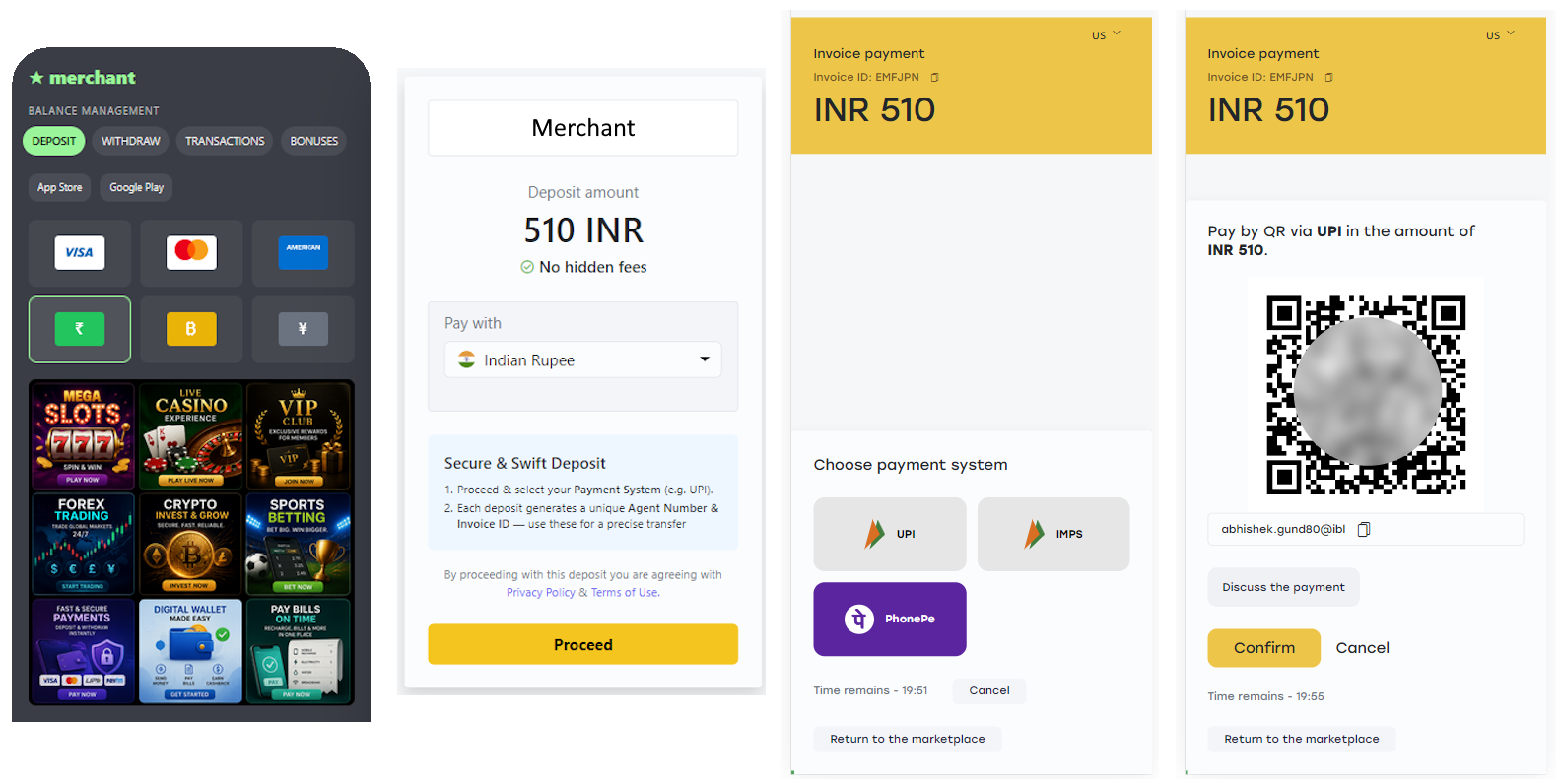
Full flow with intermediate checkout pages being shown
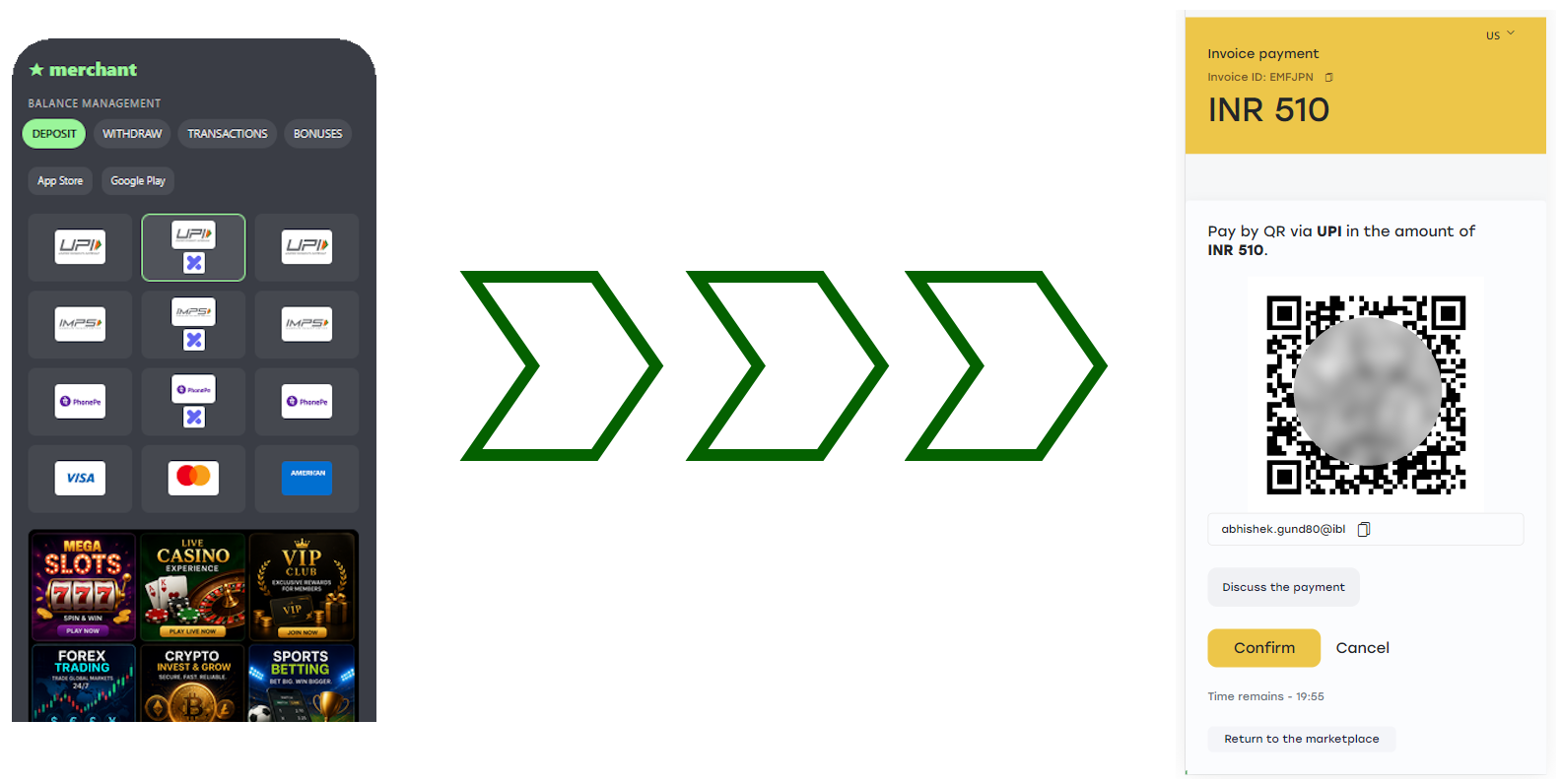
Short-cut flow (all fields populated and payment method specified)
Example with payment system pre-selected:
{
    "orderId": "order-test-prod",
    "customerId": "test-prod2025",
    "baseCurrency": "INR",
    "amount": 1000,
    "customerFirstName": "John",
    "customerLastName": "Doe",
    "paymentCurrency": "INR",
    "customerEmail": "[email protected]",
    "customerCountry": "AU",
    "customerPhone": "1234567890",
    "paymentSystem": "UPI"
}
API Response#
After a successful call, you will receive a 201 - Created response with a link to a Checkout page configured according to your request.
{
  "data": "https://checkout.xgateway.tech/ff36a7a5-08fd-418a-a150-f6f2d36676a8",
  "success": true
}
The Checkout page will prompt the customer for any data missing from the initial request that is required to create an invoice.
Once all required data is provided, the Checkout page will redirect the customer to the local payment system.
Callback Response#
One of the two transaction callbacks can be received depending on the operation cuccess: CONFIRMED or FAILED. The state of the transaction is final and cannot be changed without a dispute. Please note that rejection reason field will be null for INR payments.