KYC checks diagram#
KYC (Know Your Customer) process is optional and can be tailored to the merchants needs. Expanded flow for SEPA Secure onramp scenario is shown below (click to zoom):
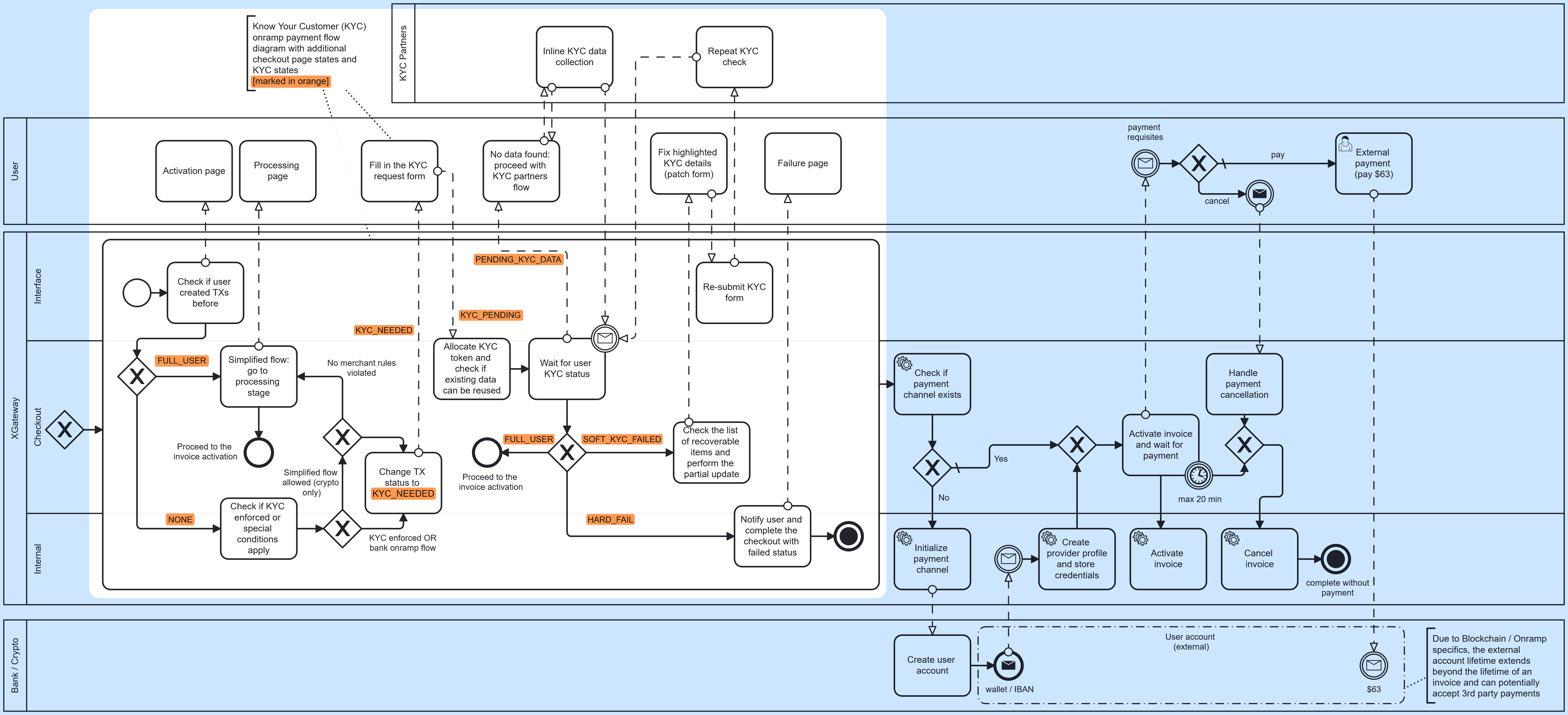
KYC processing steps#
XGateway facilitates seamless KYC (Know Your Customer) checks through integrations with trusted KYC providers. This flow is embedded within the checkout process and operates as follows:
1. Quick Status Check#
Users who have previously completed KYC are redirected directly to the payment processing page.
2. Eligibility for Simplified Flow#
Users without prior KYC status are not eligible for the simplified flow and main KYC process starts for them.
3. Simplified Flow Completion#
-
If eligible for the simplified flow, the KYC process concludes, and the user is redirected to the payment processing page.
-
Otherwise, the user's status changes to KYC_NEEDED, initiating the main KYC process.
4. KYC Data Submission#
The user is redirected to a KYC request form to input their details. Their status changes to KYC_PENDING, and additional rules may expedite processing where possible.
5. KYC Token Check#
-
XGateway performs a token check to determine if previously submitted KYC data can be reused.
-
If the token check fails, the user’s status changes to PENDING_KYC_DATA, and the checkout page integrates securely with the KYC provider for data submission.
6. Inline KYC Data Collection#
Data collection may involve multiple steps and can take some time, though most checks are completed automatically within minutes.
7. Callback and Status Update#
Upon successful verification, the user’s status changes to FULL_USER, and the invoice activation process begins.
8. Unsuccessful Verification#
Failed verification result in one of two statuses:
-
SOFT_KYC_FAILED: Recoverable errors, such as incorrect or incomplete user data. XGateway provides an inline patch form, allowing users to correct and resubmit their data, with multiple retries if needed.
-
HARD_FAIL: Indicates a suspicious user or one deemed ineligible for the transaction. This results in a failure page at checkout, invoice cancellation, and merchant notification. While the user may escalate the issue to technical support, the likelihood of a positive outcome is low.